---
title: "Playtesting HTML5 games with real recordings"
description: "Share a playtest link, watch real testers play your game on video, spot dead taps and hand your AI a fix list."
url: https://games.klyo.pl/playtesting/
canonical: https://games.klyo.pl/playtesting/
type: strona
language: en
author: klyo
organization: Klyo Illia Krasnopolskyi (NIP 7822656871), Łódź, Poland
contact: kontakt@klyo.pl
updated: 2026-11-18
llms: https://games.klyo.pl/llms.txt
---
- [klyo games](https://games.klyo.pl/)
- [For developers](https://games.klyo.pl/for-developers/)
- Playtesting
Playtest links · free
# Playtesting with a recording of every tester's game
Paste a link to your game wherever you post about it. Anyone who agrees to the test leaves you a video of the game with their cursor, taps and keys. You see where they got lost, what they tapped in vain and what made them leave.
[Invite testers](https://dev.klyo.pl/)
[AI assistants and MCP](https://games.klyo.pl/mcp/)
No credit card. The rights to your game stay yours. The animation is a real FRONTBREAK test from 18 November 2026, recorded on an ordinary computer from a developer's link.
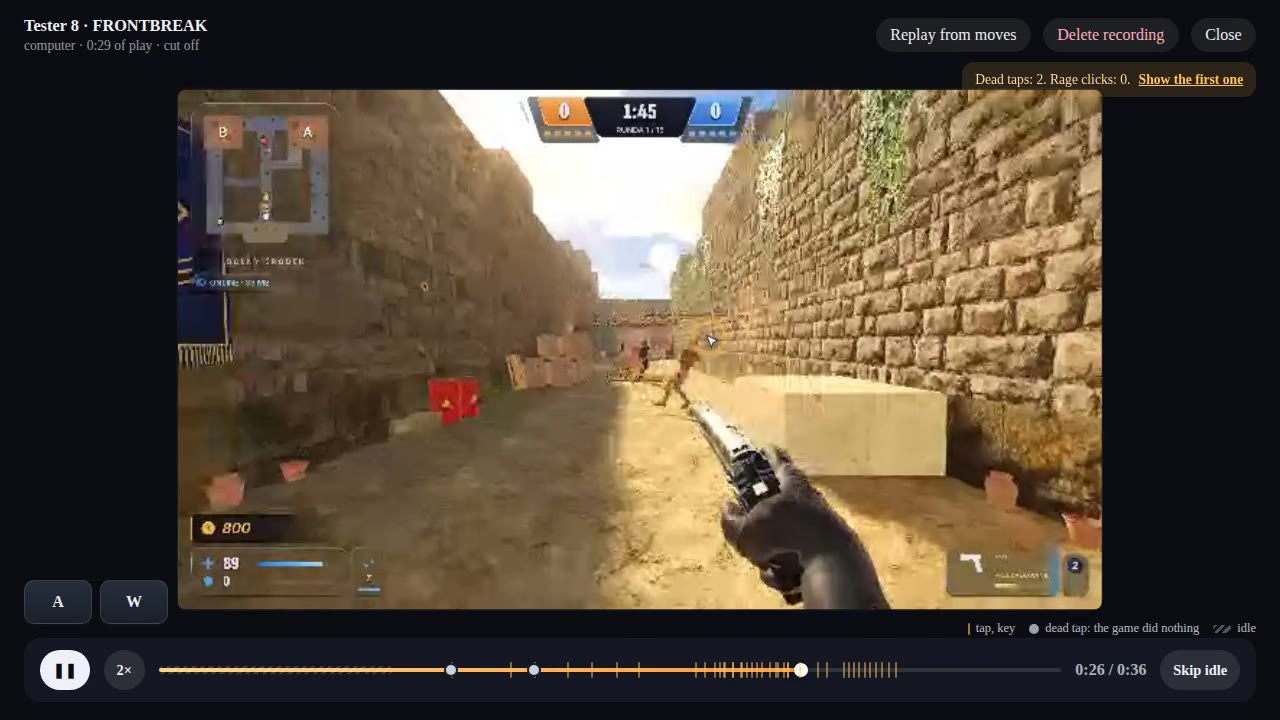
*The player in the studio: video of a 3D game (WebGPU), the tester's cursor and a timeline of their taps. Long idle moments skip by themselves.*
- **48 h** a recording lives, then deletes itself
- **2 MB** per minute of video, no slowdown
- **2D and 3D** WebGL, WebGPU and plain 2D games
- **$0** links, recordings and the AI report
## Three steps to your first recording
A link takes a minute, and you can watch the first recording before the tester stops playing.
- 1 **Pick a place**: In the studio, click “Invite testers” next to your game and choose where the link goes: Reddit, Discord, Facebook, X, WhatsApp, a QR code or a place you name yourself.
- 2 **Paste the post with the link**: You get a ready post in the language of that place. Before the game starts, the tester sees what we record and what we do not. Without consent the game simply starts as usual.
- 3 **Watch the recordings**: The recording appears in the studio without reloading the page, with a frame of the game as its cover. When someone is playing right now, a “live” mark lights up next to it.
## One link for every place you post
Every link counts on its own: how many people came, how many played longer than 30 seconds and how many left a recording. You see straight away which post really works.
- Reddit r/WebGames
- Discord your game's server
- Facebook gaming groups
- X posts for developers
- WhatsApp friends and family
- QR code meetups, streams
We write the post for you, in the language of that place. Whoever clicks plays right away on your game's page at klyo games, with nothing to install and no account to create.
## Video of the game, WebGL and WebGPU included
Most browser games draw on a canvas. Session recording tools replay the page's code rather than its picture, so the canvas stays empty in them. Microsoft Clarity says so plainly in its frequently asked questions.
Our recorder takes a picture of the canvas right after the game draws a frame, even when the engine (Three.js, Unity, Godot and others) draws outside the usual animation loop. The browser's video encoder scales it to 640 pixels and 10 frames per second. Dialogs and buttons that the game puts in HTML above the canvas are added separately, so menus and labels show up in the recording too.
Every video frame carries game time. Cursor, fingers and keys line up with the picture frame by frame, and you scrub the timeline like any video.
[Source: Microsoft Clarity, frequently asked questions, as of 18 November 2026.](https://learn.microsoft.com/en-us/clarity/faq)
- **640 px at 10 frames per second**: Enough to follow the movement and read the labels. A minute of play weighs about 2 MB.
- **The game does not slow down**: In our test the game drew 1,086 frames with the video and 1,107 without it in the same time.
- **2D and 3D games**: 2D canvas, WebGL and WebGPU. A game without a canvas replays from the recorded moves, without video.
- **48 hours**: After that the video and the log delete themselves. All videos together have a hard storage limit on our server.
## Where the game does not respond
We took three signals known from website analytics and brought them to the game canvas.
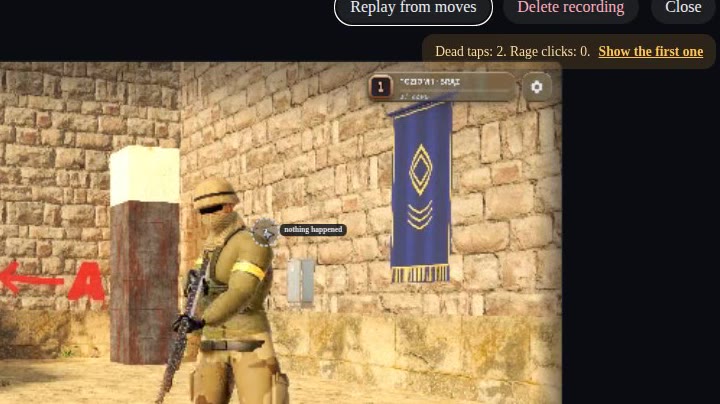
*The tester taps a character in the FRONTBREAK menu and nothing happens. The player marks the tap as dead.*
- **Dead tap**: A tap after which nothing changed for a second, neither in the game picture nor on the page. We compare it with the second before the tap, so an animated background raises no false alarm.
- **Rage clicks**: At least three quick taps on one spot, two of them dead. It usually means the button is too small, covered, or the game is waiting without any sign.
- **Idle skipping**: When the tester does nothing and the picture stands still, the player jumps ahead and says how much it skipped. When the picture moves, that part plays four times faster.
## A fix list for your AI assistant
We turn the recordings into a report. Dead taps carry the name of the element under the finger and its place on the screen in percent, JavaScript errors carry their exact text, and when a tester leaves the game we save the labels that were on their screen at that moment.
An assistant connected through MCP (Claude, ChatGPT, Cursor and others) reads this report in the klyo_game_analytics tool as its first tasks. It has evidence from the recording, so it fixes the game with klyo_game_files and klyo_game_patch, and you check the fix with a new test from the same link.
This is the report after the FRONTBREAK test in which the tester tapped the minimap:
`Game frontbreak: what to fix according to 5 recordings of real testers from the last 48 h.
• Dead taps on the game canvas, 11% from the left and 19% from the top of the screen: 2 in 1 of 5 recordings
Why: Players tap here and nothing changes for a second: they expect a button, a choice or a way forward.
What to do: Watch the moment from the evidence and see what the player is looking for.
Evidence (studio → Results → Tester recordings): Tester 6, 0:59`
## What the developer sees, and what they do not
A test is about the game, not about the person. These rules apply to every recording.
- **Consent first**: Nothing is recorded until the tester agrees on the card shown before the game. They can stop the recording at any moment with the button on the game.
- **A pseudonym, not a nickname**: The developer sees a numbered tester, the country and the device type. They never see the tester's account or nickname.
- **Only the game**: We record the game itself. The rest of the screen, the camera, the microphone and text typed into fields stay out of the recording.
- **Deleted after 48 hours**: The tester can delete their recording right after the test, and the developer deletes it with one button in the studio.
- **On our own server**: Recordings are stored on the klyo server, not in another company's cloud. One test takes at most 48 MB.
- **Aged 16 and over**: Agreeing to the test confirms that the tester is at least 16 years old.
The full rules are in the [privacy policy](https://games.klyo.pl/privacy/), in the part about game tests.
## See how people play your game. Today
Create a developer account, upload your game and click “Invite testers”. You will see the first recording a few minutes after someone plays.
[Invite testers](https://dev.klyo.pl/)
[AI assistants and MCP](https://games.klyo.pl/mcp/)
---
Source: https://games.klyo.pl/playtesting/ · Built and run by klyo, a Polish technology company (Łódź) · Contact: kontakt@klyo.pl · Index for language models: https://games.klyo.pl/llms.txt