- klyo games
- Puzzle games
- FreeCell Solitaire
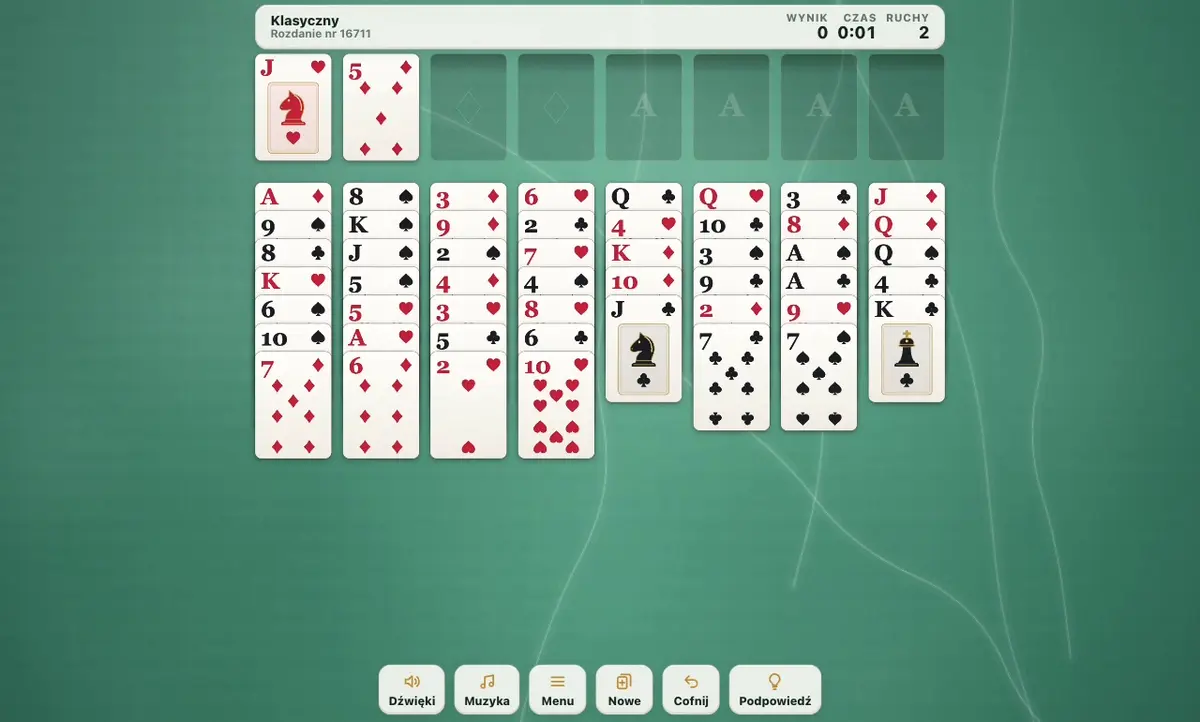
The game runs right here. Nothing to install, no account needed.
FreeCell Solitaire: play free online
Free FreeCell card game with classic deal numbers and solver hints
Published updated
FreeCell Solitaire is a card game with the entire deck visible from the start. Play free online in your browser on a phone, tablet or computer.
Edit the description- 5–10 minutesone round
- swipe · keyboardcontrols
- weekly tournamentleaderboard and trophies
- on your accountprogress on every device
- everyoneage
- browser, phoneworks on
- right awayno download, no account
Your rating
How to play FreeCell Solitaire
- 01
On a computer you play with the keyboard or the mouse; the game tells you which at the start.
- 02
On a phone: Tap a card or drag a legal run to a column, foundation or free cell. Sound effects and music have separate controls.
About FreeCell Solitaire
Plan transfers between eight columns, use the free cells as temporary space, and move every card onto the foundations.
How to play FreeCell Solitaire
Build descending sequences in alternating colours on the tableau. For example, a black eight can go on a red nine. Build the four foundations by suit from ace to king. An empty column accepts any card or sequence that you have enough spare space to transfer.
The classic variant provides four free cells. Each holds one card temporarily. Filling every cell limits your options, so try to keep some space available. You win when the entire deck reaches the foundations.
How many cards can I move together?
The number depends on the empty cells and empty columns available during the transfer. The game calculates this capacity. If a long sequence cannot move, free a cell or column, or split the transfer into smaller steps. Correct ranks and alternating colours alone are not enough when temporary space is missing.
Deal numbers, the harder mode and daily deals
Choose a deal number to return to a particular layout or compare solutions with a friend. Random deals and a daily deal are also available. For a harder challenge, try the two cell variant. Having less spare space makes the order of your moves more important.
Hints and taking moves back
Hints analyse the current arrangement to help you find a route forward. Use them when you want assistance, or work out your own plan. Undo lets you return to an earlier position and try another order. The game saves unfinished play and tracks your statistics. When Finish is available, it can move the remaining cards to the foundations.
FreeCell strategy tips
Locate the aces and identify the cards blocking them before your first move. Before occupying a free cell, plan how you will empty it. Treat an empty column as workspace for rearranging sequences. Compare move orders: two routes to the same uncovered card may require different amounts of temporary space.
Controls, separate sounds and music
Drag cards with a finger or mouse, or tap a card to move it to a suitable destination. Separate Sounds and Music buttons remain beside the table throughout play. Mute the music while keeping card effects, or listen to music alone. Both settings are remembered.
The collection previews your current deal with different table materials and card backs. Choose a light or dark theme or a four colour deck for a clearer view. Changing the appearance does not start a new game, and the device's reduced motion preference limits animations.
Do I need to install anything
No. FreeCell Solitaire runs in the same browser tab you are reading now. There is no store download, no account and no e-mail to give. The game is free and stays free.
Your score and progress are saved on your device, not only on our server, so you see your record when you come back.
Questions about FreeCell Solitaire
Is FreeCell Solitaire free?
Yes. FreeCell Solitaire is completely free: no in-game payments, no premium account and no trial that runs out.
Does FreeCell Solitaire work on a phone?
Yes, in the browser on phones and tablets. Controls: Tap a card or drag a legal run to a column, foundation or free cell. Sound effects and music have separate controls. On a computer: see the in-game controls.
How long is a round of FreeCell Solitaire?
Usually 5–10 minutes. The game keeps your best score on your device, so you can come back any time.
Do I have to download FreeCell Solitaire?
No. The game opens from a link in this tab, on a phone or a computer.
Comments
More games by this creator
See all-
-
-
-
-

-
-
-
More games
That is everything for now
We have 33 games today and you have seen them all. This portal grows from developers, not from purchases. If you make games, yours will stand next to these.
For developers
Made a similar game? Publish it next to this one
One ZIP, one form and your own address within minutes. The rights stay yours, the ad stands beside the game and never in front of it, and 70% of the ad revenue next to your game comes back to you every month.