- klyo games
- Puzzle games
- LEXI: Word Garden
The game runs right here. Nothing to install, no account needed.
How do you like LEXI: Word Garden?One star is all it takes. The creator sees your rating.
LEXI: Word Garden: play free online
Online word puzzle with 120 levels and a new daily challenge
Published
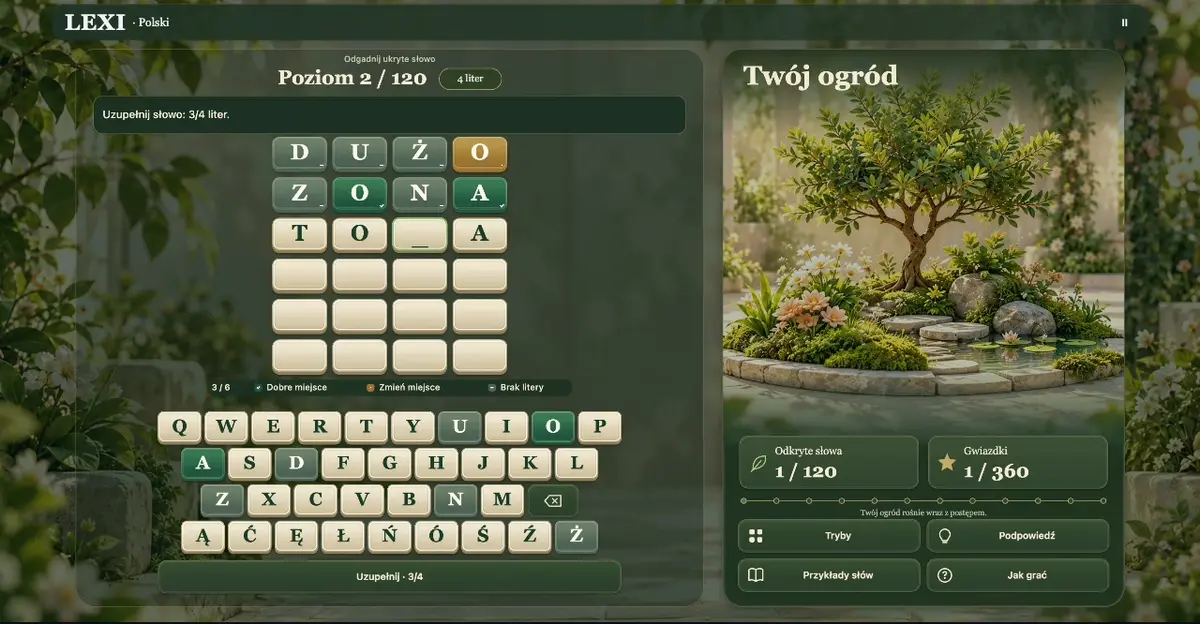
LEXI: Word Garden is a free online word puzzle where you discover a hidden word in six attempts. Choose your own first guess, check its letters and use the clues to improve your next move.
Edit the description- No time limitone round
- touch · arrows / WASD + mousecontrols
- weekly tournamentleaderboard and trophies
- everyoneage
- browser, phoneworks on
- right awayno download, no account
Your rating
How to play LEXI: Word Garden
- 01
On a computer: Click a cell and type a letter, or use the on-screen keyboard. Arrow keys, Home and End move the selection. Enter on the board checks the word. Backspace removes the selected letter or the previous filled cell to its left; Delete clears only the selected cell. Escape pauses play or closes a dialog. You can also type accented letters directly.
- 02
On a phone: Tap any cell in the current row, then tap a letter on the game keyboard. Fill the gaps and tap Check. Backspace on the right removes the selected letter without shifting other letters. The extra-letter button provides language-specific characters on small screens. Use Modes to change the challenge or How to play for help.
About LEXI: Word Garden
Play in your browser on a phone, tablet or computer without installing an app. Your goal is to find the complete answer while building progress through a peaceful garden of words.
A green tile means the right letter is in the right position. An amber tile means that letter belongs elsewhere, while a grey tile means there is no additional copy of that letter in the answer. Symbols accompany the colours. Select any cell in the current row, place known letters first and fill the remaining gaps in any order. Backspace removes a letter without shifting the others. Check submits a complete, recognised word.
The campaign contains 120 levels across 12 chapters. Start with shorter answers and work towards longer words. Earn stars for solved puzzles and return to your saved progress whenever you want another challenge. Practice mode lets you choose words with four, five, six or seven letters. There is no countdown, so you can compare previous guesses and think through each position at your own pace.
The daily puzzle provides a new five-letter answer for everyone playing in the same language. It changes at midnight UTC. An archive also lets you try puzzles from the previous seven days. Daily play has no letter hints, and a winning unassisted result can enter the leaderboard. In other rounds, revealing a letter can help you continue but reduces the stars available for that solution.
Play in Polish, English, Ukrainian, Russian, German, French, Spanish, Portuguese, Italian or Turkish. Each language has its own vocabulary and separate progress. Expanded dictionaries recognise many inflected word forms as well. The Word examples panel offers ideas for a guess and shows only a selection of accepted words. An incomplete entry, an unrecognised word or a repeated guess does not use an attempt.
An interactive introduction teaches the rules on the actual board. Light and dark themes, ceramic tiles and gentle sound effects support relaxed play. Mute the audio, pause a round and resume your unfinished entry with its gaps preserved. Familiar keyboard rows and direct cell selection make it easy to correct a single letter using touch, a mouse or a physical keyboard.
Do I need to install anything
No. LEXI: Word Garden runs in the same browser tab you are reading now. There is no store download, no account and no e-mail to give. The game is free and stays free.
Your score and progress are saved on your device, not only on our server, so you see your record when you come back.
Questions about LEXI: Word Garden
Is LEXI: Word Garden free?
Yes. LEXI: Word Garden is completely free: no in-game payments, no premium account and no trial that runs out.
Does LEXI: Word Garden work on a phone?
Yes, in the browser on phones and tablets. Controls: Tap any cell in the current row, then tap a letter on the game keyboard. Fill the gaps and tap Check. Backspace on the right removes the selected letter without shifting other letters. The extra-letter button provides language-specific characters on small screens. Use Modes to change the challenge or How to play for help. On a computer: Click a cell and type a letter, or use the on-screen keyboard. Arrow keys, Home and End move the selection. Enter on the board checks the word. Backspace removes the selected letter or the previous filled cell to its left; Delete clears only the selected cell. Escape pauses play or closes a dialog. You can also type accented letters directly.
How long is a round of LEXI: Word Garden?
Usually No time limit. The game keeps your best score on your device, so you can come back any time.
Do I have to download LEXI: Word Garden?
No. The game opens from a link in this tab, on a phone or a computer.
Comments
More games by this creator
See all-
-
-
-
-

-
-
-
More games
That is everything for now
We have 41 games today and you have seen them all. This portal grows from developers, not from purchases. If you make games, yours will stand next to these.
For developers
Made a similar game? Publish it next to this one
One ZIP, one form and your own address within minutes. The rights stay yours, the ad stands beside the game and never in front of it, and 70% of the ad revenue next to your game comes back to you every month.